eCargosens 2.0 is a wireless axle load monitoring system from Escort Monitoring Systems designed to help transport companies monitor axle loads, control vehicle loading and reduce the risk of overloads.
Recently, we updated eCargosens to version 2.0. The changes go beyond the mobile app interface: we also redesigned the system architecture and the way its components interact.
As a result, eCargosens is now easier to configure and maintain, more flexible when working with different semi-trailers, and gives drivers a clearer view of axle loads directly from the cab.
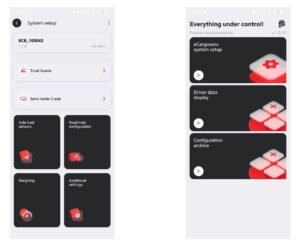
eCargosens 2.0 main screen and system setup with key configuration sections
Centralized architecture for simpler and more stable operation
One of the main changes in eCargosens 2.0 is the redesigned system architecture.
The system consists of two main components: an eCargosens DS cabin unit and an eCargosens Air axle load sensor connected to the vehicle’s pneumatic circuit.
Previously, the axle load sensor handled part of the data processing itself: it stored calibration tables, converted pressure readings into axle load values and sent the processed data to the cabin unit. During configuration, the mobile app effectively communicated with the sensor through the cabin unit.
In eCargosens 2.0, this logic has changed. The axle load sensor now provides raw pressure data from the pneumatic circuit, while the cabin unit performs the calculations and stores the configuration data.
Centralizing these processes makes communication between the system components more reliable and also enables several other improvements introduced in eCargosens 2.0.
Quick semi-trailer changes without re-pairing sensors
For fleets where the same tractor operates with different semi-trailers, changing the vehicle combination can require additional configuration work.
Previously, because configuration data was stored at sensor level, information about the sensors installed on a different semi-trailer had to be entered manually when the semi-trailer was changed.
In eCargosens 2.0, configuration files are stored in the cabin unit. If a tractor regularly operates with different semi-trailers, the corresponding configurations can be saved in advance. After changing the semi-trailer, the user simply selects the appropriate saved configuration instead of setting up and pairing every sensor again.
This makes the system more convenient for fleets where tractors and semi-trailers are regularly recombined.
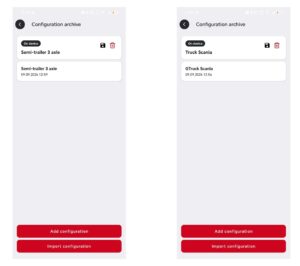
Saved truck and semi-trailer configurations in the archive
Easier axle load sensor replacement without recalibration
Replacing an axle load sensor, for example if a device fails, has also become simpler.
After installing a new sensor, the service technician only needs to pair it in the app in place of the previous one and update the vehicle combination configuration.
There is no need to weigh the vehicle again or transfer the calibration table from the old sensor to the new one.
This reduces maintenance time and lowers the risk of errors when replacing equipment.

Axle load sensor connected to the vehicle configuration
Flexible sensor configuration for multi-axle semi-trailers
eCargosens 2.0 also provides more flexibility in how axle load sensors can be assigned to individual axles.
For semi-trailers with a common pneumatic circuit, a single axle load sensor can be used for several axles. A separate calibration table is created for each axle, allowing the system to calculate the load on each one individually using pressure data from the same sensor.
For example, if one sensor is installed on a three-axle semi-trailer without lift axles, the same sensor can be selected for all three axles in the configuration. Its pressure readings are then processed using three different calibration tables to determine the load on each axle separately.
If the semi-trailer has a lift axle, however, that axle still requires a separate axle load sensor.
This configuration is not suitable for every vehicle and depends on the design of its pneumatic system. Where applicable, however, it can reduce the amount of equipment required and lower the overall cost of implementation.
The app also allows the installer to configure individual axle parameters, including whether an axle is measured or calculated and whether it is liftable.
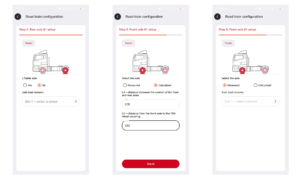
Road train configuration: lift axle settings, calculated axle setup and axle load sensor assignment
Step-by-step setup in the eCargosens app
The mobile app has also been redesigned to make configuration more structured and intuitive.
Instead of working through a collection of separate settings screens, the installer follows the main setup stages in a logical sequence. The app guides the user through the process:
- creating configurations for the truck, semi-trailer or trailer;
- pairing axle load sensors;
- configuring the vehicle combination, including axle types, lift axles and sensor assignments;
- weighing the vehicle and saving calibration tables;
- configuring addresses for data transmission to a digital display or GPS/telematics terminal.
This step-by-step approach makes it easier to understand what needs to be configured next. It reduces the risk of errors during initial setup, shortens commissioning time and makes the app easier to use even for technicians working with eCargosens for the first time.
Clear axle load data for drivers
eCargosens 2.0 also provides a dedicated view that makes load information easier for drivers to understand.
The driver can see a diagram of the complete vehicle combination showing all axles, the load on each axle and the total weight. This allows the loading process and load distribution to be monitored directly from the cab.
For example, if a forklift operator places heavy pallets too close to the front of the semi-trailer, the driver can immediately see a critical increase in load on the drive axle. The driver can then ask for the cargo to be repositioned before departure, reducing the risk of an overload violation at a weigh-in-motion checkpoint.
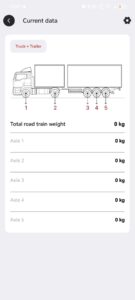
Driver view with total road train weight and per-axle load data
“We have essentially redesigned the entire system architecture, solving several practical challenges at once. Setup now takes less time, while changing semi-trailers or replacing axle load sensors no longer requires recalibrating the system or configuring it again from scratch. Drivers also get a clear real-time view of axle loads directly from the cab.
For us, eCargosens 2.0 marks the transition from a complex service tool intended mainly for experienced specialists to a practical solution for everyone involved — installers, transport companies and drivers,” comments Alexey Chugunov, Head of eCargosens.
Getting started with eCargosens 2.0
New eCargosens systems use the 2.0 architecture and are configured through the eCargosens 2.0 mobile app.
The eCargosens 2.0 app is available from official app stores:
For assistance with eCargosens configuration, integration or an axle load monitoring project, contact the Escort technical support team at help@escortsensors.com.